Quickly set task priority using ! mark
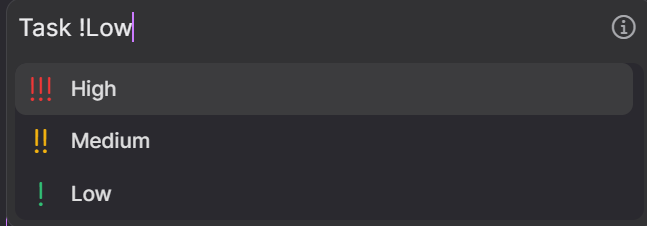
When creating a new task, I often use the helpful shortcut keys (e.g. # for projects, < for deadlines). However, I've noticed an inconsistency - when I add an exclamation mark (the symbol for priority) and then type after it, it doesn't select the correct priority, requiring me to manually click or use the arrow keys to get anything other than high priority. I feel like this would be pretty easy to implement, since this text-completion is used for all the other shortcuts - see the attached photo to get what I mean - I feel like this input should cause it to select low (really just the letters h, m, and l should be enough, since there are just 3 options!)
Thanks for your awesome work :)
Log in to comment and vote
Comments3
Mar 26, 2024
Hi everyone!
In the new released, today, we enhanced the priority filtering in the Command Bar: Typing !H (for example) now filters for high-priority options only.
Remember, typing the exact label (e.g., !Low) will immediately recognize and apply your desired priority, projects or tags.
Let me know if there's anything else we can improve for you!
Allie
Mar 27, 2024
Stefania Awesome, thanks so much :)
Mar 14, 2024
Hi everyone, if you add a space after that writing the right priority, so as in Allie's screenshot "!Low", Akiflow will recognize "Low".
But we'll soon add the "filter" as in the other commands, so if you type "!L" we'll suggest only "low". Thanks for your help:)