Today view: Split "Scheduled on calendar (for the future)" from "Scheduled in the past (in the past, overdue)"
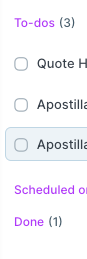
The Today view by default collapses the "Scheduled on Calendar" group of tasks. However, there is no easy way to notice (or act on) that you have tasks you had planned for earlier today that you didn't finish and need to be replanned or marked as complete.
A possible solution could be having a new section after the existing "To-dos" section titled "Scheduled past due" or something like that which would be expanded by default and let you easily re-drag tasks to another time or day.
After that section, you would still have "Scheduled on calendar" for upcoming tasks and "Done" for those you finished
Log in to comment and vote
Comments3
Mar 17, 2023
Thanks Guido, let me know if there's anything else we can improve!
[Deleted User]
Mar 16, 2023
You are right, I didn't know/notice that behavior. That's more than enough! :)
[Deleted User]
Mar 16, 2023
Hi Guido, if you don't complete a task in 1 hour or so from the scheduled time, it's moved to the "Todos" section with a red badge saying "overdue", is this working for you?
I'm attaching a screenshot, let me know what you think!