Working with Aki to manage my inbox (as in your marketing examples) is not working
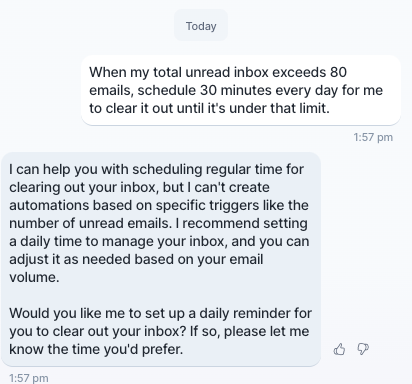
I asked Aki to help me manage my inbox by scheduling time any time my inbox has more than 80 unread emails. This is from the example you have on the marketing page for Aki. But it's not actually a real example of functions that Aki can serve, is that right?

Log in to comment and vote
Comments4
Jeson P
Apr 7, 2025
Hi Maryam Shariat Mudrick! Thanks for pointing this out, and I totally understand the confusion.
Right now, Aki can’t automatically schedule time based on the number of unread emails — that type of trigger-based automation isn’t supported yet. The current automation features are time-based only, though we are exploring trigger-based options for the future.
The example you saw in our marketing materials is meant to show what Aki could help with when set up correctly — for instance, we do have an “inbox is full” automation template in the settings, but it doesn’t currently apply to unread email counts specifically.
We really appreciate your feedback, and if you'd like, we’re happy to pass this along to our product team and keep you posted on updates.
Thanks again for your patience!
Maryam
Apr 8, 2025
Jeson P yes please pass it on to the product team
Jeson P
Apr 11, 2025
Maryam Shariat Mudrick: Yes! This is actively being reviewed by the relevant team so it is great that we discussed it here :)
[Deleted User]
Apr 28, 2025
Maryam Shariat Mudrick: Hi Maryam, did you setup our Inbox zero automation? that would check every day if your inbox is full and propose some time to clear it out!