Full-Day Compact Calendar View (24-Hour Adjustable Scaling)
Current Behavior:
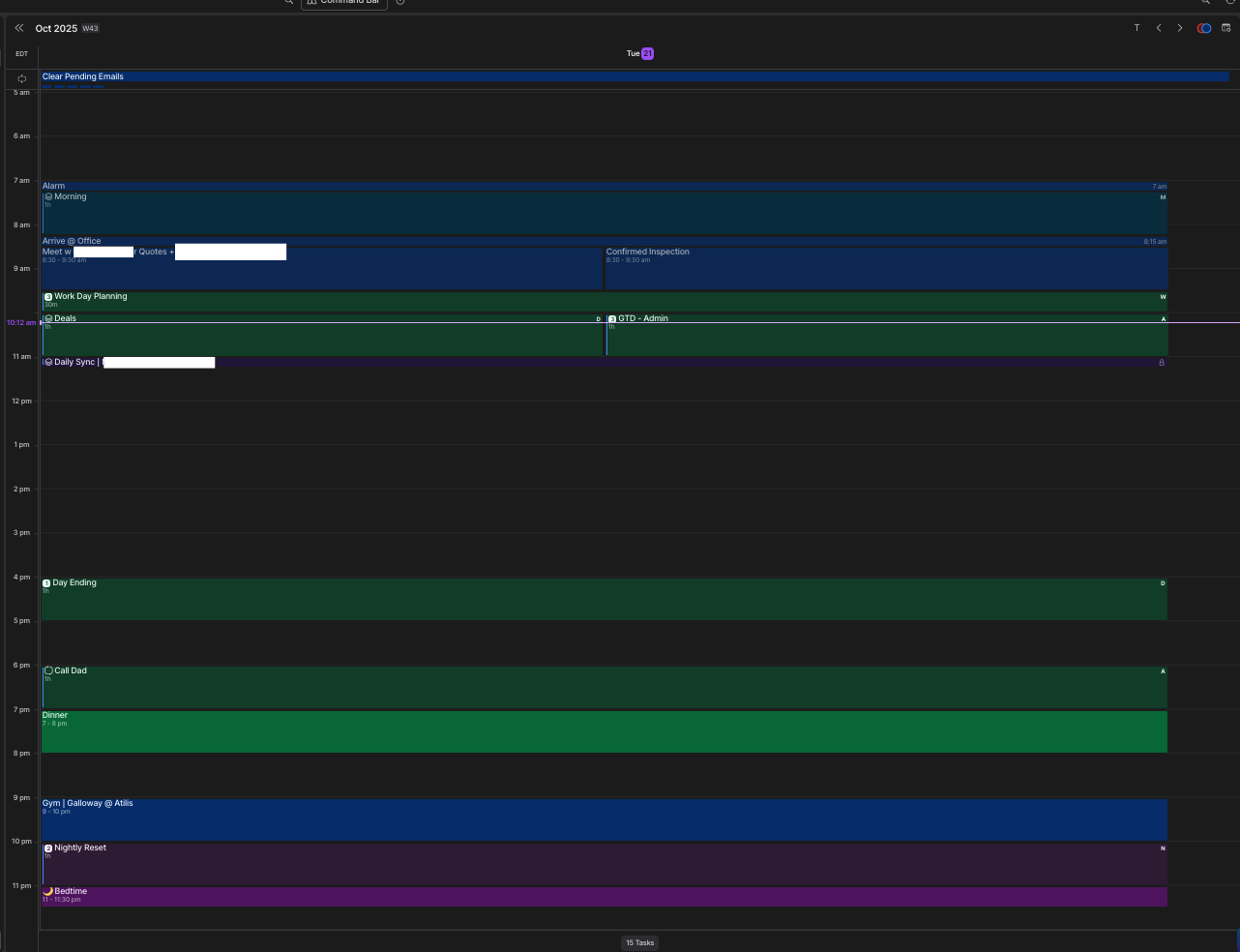
The Akiflow calendar currently limits visible hours to roughly a 12 hr range. In my example ; 7 AM → 7 PM, even with display density set to Small. There is no way compact the calendar to view a full-day overview. The only option is to set zoom to lowest / near lowest option (67% or so),
but it ends up making the text unreadable because it’s shrinking the text. In my case. the calendar time block boxes are plenty big enough to accommodate larger text but arent because your zooming the entirety of the app.
Problem:
For users who manage tasks outside standard business hours (early-morning prep, late-night wrap-ups, etc.), the inability to see the entire 24-hour day at once makes planning and time-blocking inefficient.
Some other calendar tools provide adjustable zoom or compact modes, letting users view more or fewer hours of the day within the same vertical screen space.
Proposed Solution:
Add an adjustable zoom/compactness slider or toggle to the Calendar view, allowing users to:
Zoom out to see the full 24 hours of the day on one screen.
Zoom in for a more detailed view of morning/evening blocks.
Optionally save default “zoom levels” for preferred daily layouts (e.g., “Workday View” vs. “Full-Day View”).
Impact:
This feature would:
Improve situational awareness of the day at a glance.
Support users with non-traditional or flexible schedules.
Make Akiflow feel more on par with modern calendar UX standards.
Log in to comment and vote
Comments8
[Deleted User]
Sep 22
•Merged request
•4 votes
UI Density Setup (Compact/Comfortable View).
Currently, the space allocated for tasks is very small. If I have 2-3 small tasks in an hour, it is difficult to fit them in the slot. Also, it gets difficult to read them as they jumble together.
It is nice to have the current compact view which gives me an overview of the entire day. However, it makes it difficult to read individual small tasks.
The proposed compact view is to have an overall look into my day and the comfortable view is to be able to read them properly. I would love to switch between these two views with a keyboard shortcut.
Something like this:
[Deleted User]
Oct 12, 2022
Hi Syed, thanks for your feedback:) May you provide an example of a group of tasks you find difficult to fit in a slot on calendar? Thanks.
An Anonymous User
Sep 22
•Merged request
•2 votes
Adjustable Zoom and Density Control on Main Screen for Better Day Overview
It would be great if I could change directly in the main screen (without going to settings) the density / zoom factor freely with something like a zoom bar so I can see my day
a) with 24h on one screen without scrolling
b) with 12h on one screen
c) with 6h
d) with 3h
e) with 2h
would be great to allow gestures to zoom in/out like zooming into a picture.
Background: I like to see my day first thing at the morning at a glance. When moving tasks and appointments I need some zoom level in between like 6h and when I work on something I love to keep my calendar with a 3h window to really concentrate on my current tasks (even if they are 5-15mins each. In this scenario I'd like to have a possiblity to change from the grouped view of for example "3 tasks" into "task 1 xxxx", "task 2 xxxx", "task 3 xxxx" all next to each other (as this will be very readibly on max. zoom factor.
Nunzio
Sep 18
•Merged request
•13 votes
24-hours visibile in the calendar without scrolling
[Deleted User]
Nov 29, 2022
yess, option to reduce the height of each hour increment would also be great
Younghyeon
May 6
•Merged request
•4 votes
Calendar: 24 hour day view without scrolling
It would be nice to have the option to view whole day (24hours) in one page without having to scroll.
Tayyab
Apr 22
I was just going to propose something similar. My proposal is to make the time bar on the left slidable like what the trading websites do on their graph views. You grab it, slide up, it expands the y-axis. Slide down, it contracts the y-axis.
Jayrich Sebullen
Oct 23, 2025
Thanks for sharing this with us @Shaun Crews