Changelog

Follow new updates and improvements to Akiflow.

Focus Timer is finally here 🙌

📢 Desktop Only Feature: This feature is available only on our desktop app.➡️ Download Desktop: Click here to get it!
Screenshot 2025-02-25 at 12

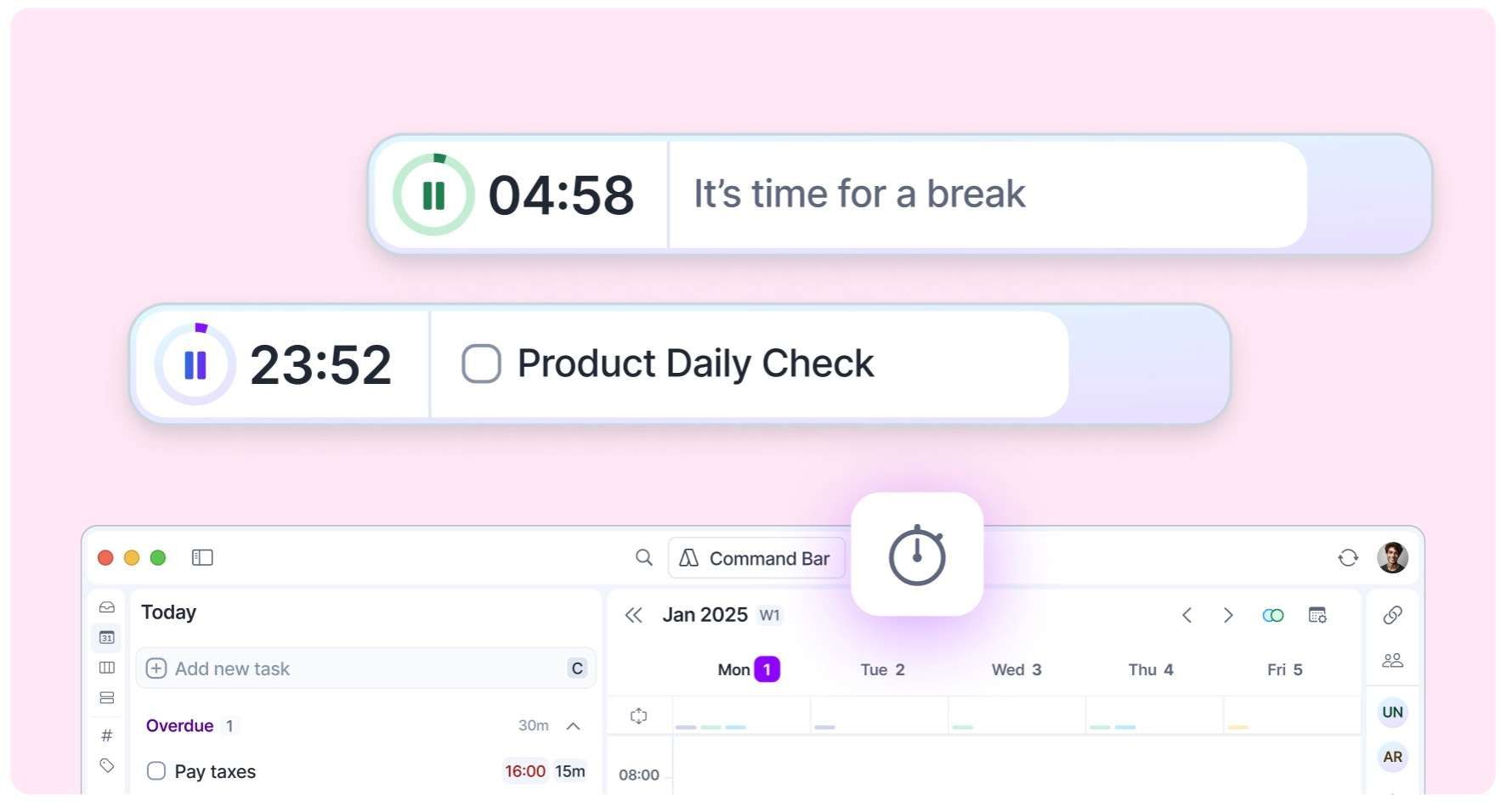
You can now structure your work with 🍅 timed focus sessions!


Start your timer and it’ll stay visible on your screen to keep you focused.

👀 See your ongoing timer in two places:

  • In the Akiflow header

  • Floating on your computer screen -> yes, you can move it!☑️ Tasks: The timer will show your current task in calendar, so the first task in your Today's "Schedule in calendar" section, based on your sorting option.❤️‍🩹 Oops: If that section is empty..well you should plan tasks in your calendar;) but until then, the timer will show your To-Dos and Overdue tasks.🎧 Settings: Set your timer with the** settings** that work for you. The default is 25m focus, 15m break, repeated 4 times.🔔 Sound: With a nice sound, it’ll remind you when it’s time to start a break or focus period.📚 Learn more: Focus Timer Guide
Release 2.47New

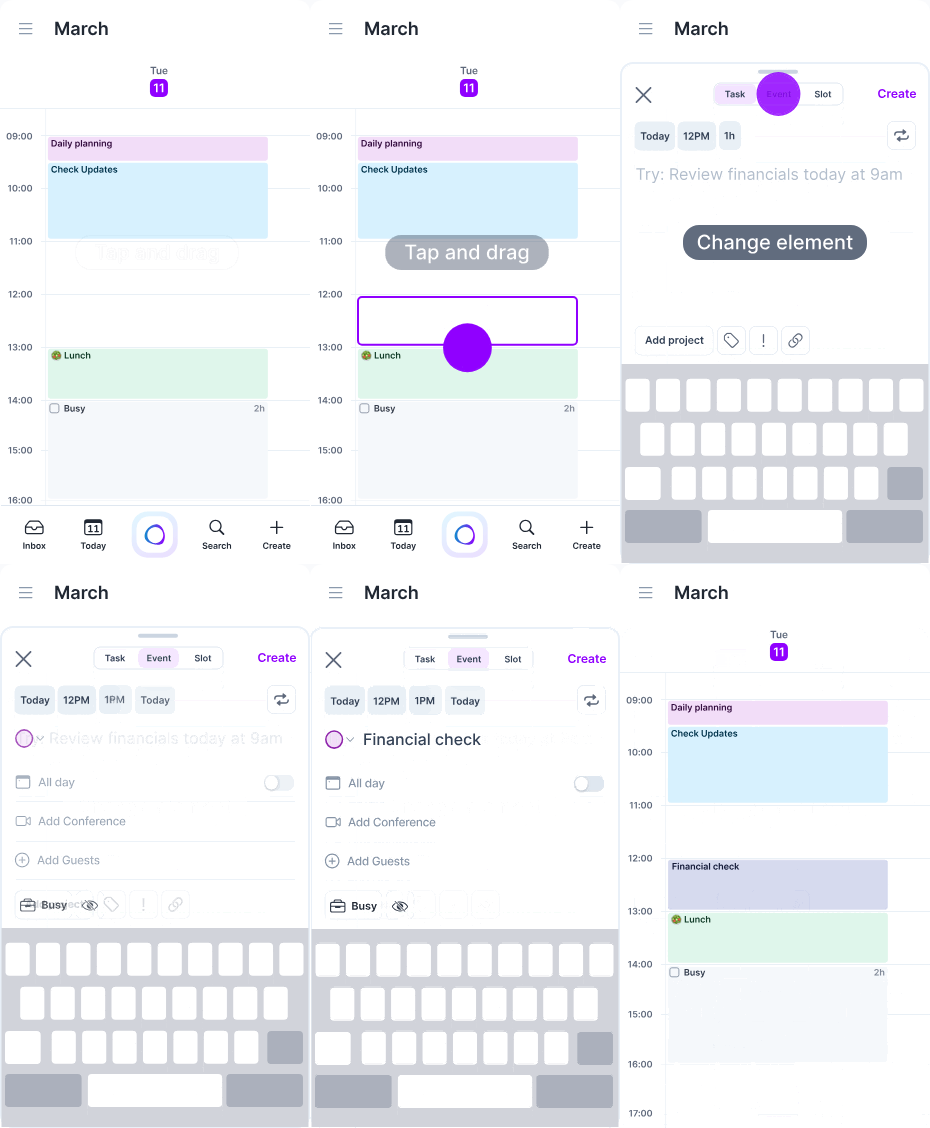
New 💥 Create elements in Mobile Calendar📱

✏️ Design in calendar to create your favorite element

You can now Tap or Tap + hold + drag in calendar to create your favorite element

  • 📏 The placeholder can be resized, moved and minimized to check your calendar (by swiping it down).

  • ⚙️ Customize which element to open (Event, Tasks or Time Slot) by going to Settings > Calendar Appearance.

  • 🕒 Customize their default duration by going to Settings > Tasks, Events, Slots.

🔄 Switch between elements

  • You can now switch between elements while creating them.

  • Basic information like title and time will be saved when switching from one element to another.

☑️ Create tasks edits

  • The + button has been moved to the app footer and opens Task creation by default. As mentioned above you can then switch to event or time slot in one tap.

Aki in app ✨ Your Personal AI Executive Assistant (beta)

Aki is your productivity co-pilot, here to help you plan your day, organize meetings, automate tasks, and supercharge your productivity.

Screenshot 2025-02-25 at 12

Aki in Apps 💡

Aki is now available not only on WhatsApp but directly within your Akiflow apps!Find it in the new footer of the mobile app and at the bottom-right of the desktop app.

Coming Soon 🔜

  • 🚀 Phased rollout: We’re starting with select users and gathering their insights to fine-tune the feature before making it widely available.

  • If you don’t have access yet, stay tuned – Aki is on the way! Read more.

Notifications & Settings 📣

⚙️ Settings: Aki is now listed in your AI Center Settings page.🔔 Notifications: Your desktop and mobile apps (download them here!) will notify you of any Aki messages.

Automations 🤖

Aki can automatically:

  • 🌤️ Deliver your daily weather forecast each morning.

  • 📅 Review your schedule for conflicting events.

  • 💸 Monitor Bitcoin prices and alert you when it drops below $80k.

  • 📝 Provide a daily overview of your schedule.

  • 🏃‍♀️ Schedule your morning run based on tomorrow’s weather: For example, “Every day at 7:30 AM, check tomorrow's weather in Barcelona. If it's good, add a morning run to my calendar and remind me.”The possibilities are endless! ✨ You can set up any of Aki’s existing capabilities (tasks, events, scheduling, weather, currency tracking) to run automatically on a recurring basis. The only thing automations can’t do is create other automations.

How to Use It 🛠️

Simply phrase your request with timing words like:

  • ⏰ "Remind me of this every day"

  • 📅 "Do that every Monday"If multiple automations run within 15 minutes of each other,** Aki will smartly combine them** into a single message to avoid spam.You'll receive automations on Aki in apps only (not on WhatsApp!)

Earlier updates